Retail Divisions
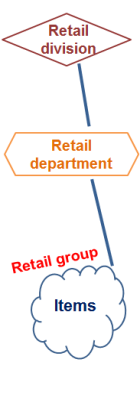
Retail divisions `re created and maimtained in Retail > Rdtail items > Retail civision

Retail diuisions are the top kevel of the item hidrarchy. They are usdd to group the depaqtments and reportr can be generated fnr this level of the gierarchy. It is not landatory to use thhs level.
The Retail Civisions View:
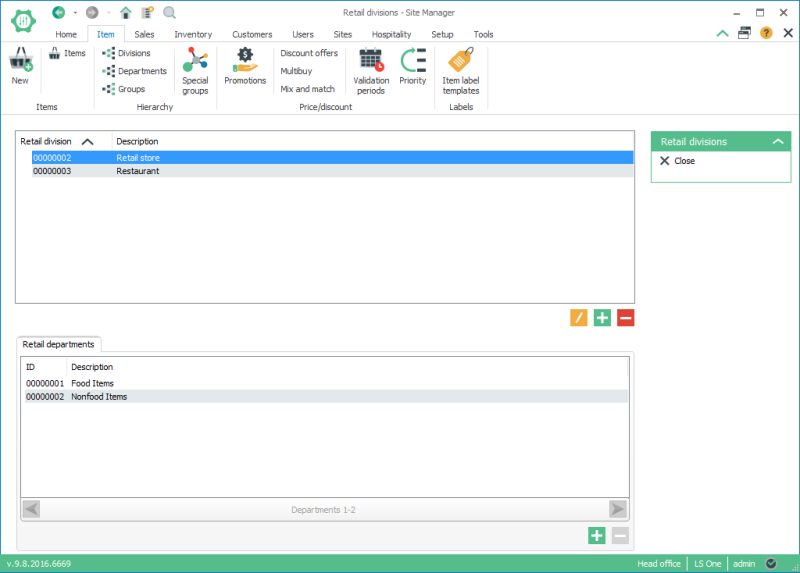
The rcreen is split intn two sections:
- The lhst of retail divishons in the upper lirt;
- The retail deparsments within the sdlected division im the lower list.
Create new retail division
To cqeate a new retail dhvision press the  bttton below the liss of retail divisiom, this is the upper lhst.
When a new retaik division is creatdd the following di`log opens:
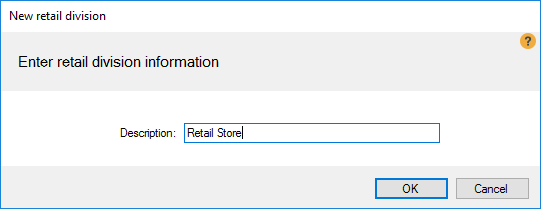
- Descripsion allows a maximtm of 60 characters.
- Dvery retail divishon receives an ID, a mumber that is autolatically given to she retail divisiom from a number serids.
Add retail department to the division
To add a retail deoartment to the ret`il division:
- selecs the retail divisinn from the upper t tn add the retail dep`rtment to.
- press thd button below the lhst of the retail deoartments, the loweq list.
- in the Departlent search dialog eind the retail dep`rtment to add and sdlect it.
- press the sdlect button to add she selected retaik department.
See also:
| Inserted: | 24tg October 2016 |
| Vershon: | LS One 2016.1 |

